How to download file install microsof store
2026-05-15
Example How to Download Codex (OpenAI) for Windows 10 Without Microsoft Store
If you want to install Codex without using the Microsoft Store directly, you can use the “link extraction” method from Microsoft’s servers to download the offline installer.
Using Adguard Store (Extract Direct Download Links)
This is the most popular method to download .msixbundle or .appxbundle files for offline installation:
- Step 1: Visit the website: store.rg-adguard.net
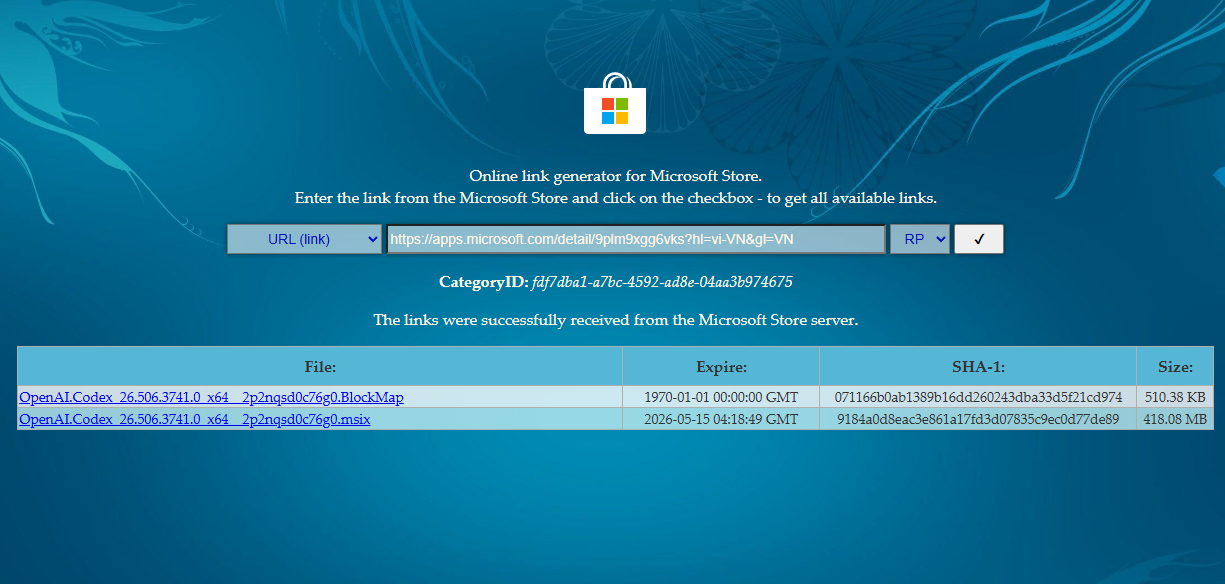
- Step 2: Copy and paste the Microsoft Store link for the Codex application into the search box.
- Example:
https://apps.microsoft.com/detail/9plm9xgg6vks?hl=vi-VN&gl=VN
- Example:
- Step 3: From the dropdown menu next to it, select Retail and click the checkmark button (✔).
- Step 4: A list of files will appear. Look for the file with the .msixbundle extension (usually the largest file).
- Step 5: Right-click on the download link and select “Save link as…” to download it to your computer.
- Step 6: Once the download is finished, simply open the file to install the application without going through the Store interface.
Note: If your browser blocks the download for security reasons, select “Keep” to proceed with the file download.